

How to Edit Video with Claude Code, End to End on a Mac
Edit video with Claude Code on your files: how BetterLibrary and BetterEdits teach the agent with a guide in every folder, one prompt run end to end, and the limits.
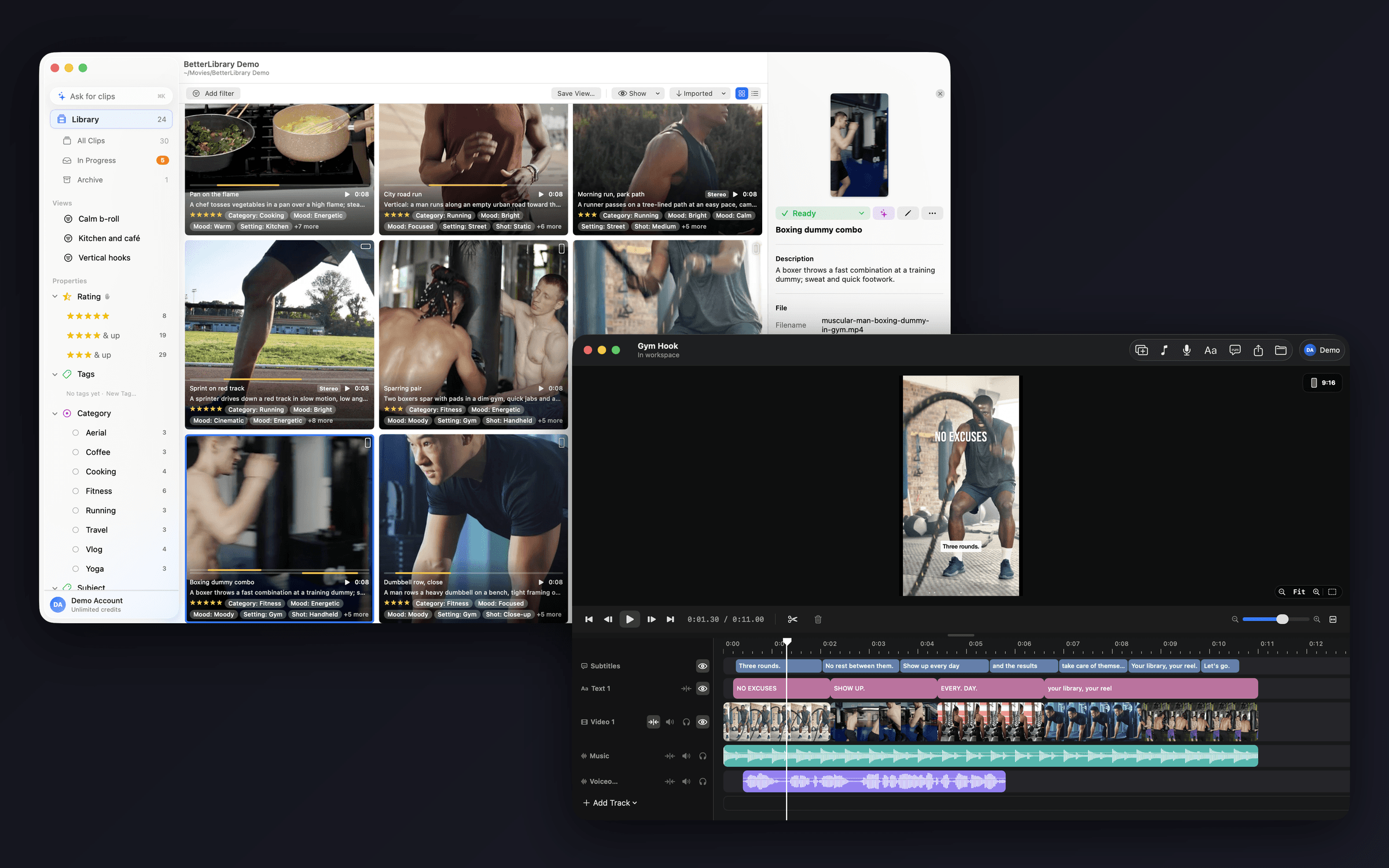
To edit video with Claude Code you need video tools that teach the agent how they work. BetterLibrary and BetterEdits both write a CLAUDE.md guide into every library or workspace they create. Open Claude Code in a folder of footage, say what you want, and watch the apps do it. Here is what that looks like, one prompt run end to end, and where it stops.
What editing video with Claude Code looks like
You open Claude Code in a library folder and type: "Find the three best energetic gym clips, cut them into a 9:16 reel with captions, and export it." The agent reads the guide in the folder, finds and exports three highlights in BetterLibrary, then cuts, captions and checks the timeline in BetterEdits, and exports an MP4.
That is the whole idea. No plugin, no API key hunt, no uploading footage to a web tool. The agent works on your files, on your Mac, through the same code the app windows use, and both apps show every step on screen.
 BetterLibraryRead the library's guide. Searched the Library shelf for energetic gym footage by meaning: 3 portrait clips, all rated 4 or more.BetterLibraryExported the highlight of each as a lossless trim: Battle ropes, Boxing dummy, Dumbbell row.
 BetterEditsStarted a 9:16 video called Gym Hook in the workspace and put the three files on the timeline, 11 seconds.BetterEditsTranscribed the track into 7 caption bars in the Ink style, and added the title NO EXCUSES over the first clip.BetterEditsLooked at a contact sheet of the cut, then exported Gym Hook.mp4 at 1080 × 1920.
For a solo creator the bottleneck was never one tool. It is the loop: sort, pick, cut, caption, export, every week. An agent that can run the loop while you watch is the difference between "I should post this" and a file in exports/.
Every folder teaches the agent
When BetterLibrary creates a library, or BetterEdits creates a workspace, the app writes a guide into the folder: what it can do there, and how clips, tracks, text and captions behave. The file is CLAUDE.md (BetterEdits also writes BetterEdits.md alongside it, imported from CLAUDE.md), so Claude Code reads it on its own the moment you open a session there.
Three details make this work in practice rather than on a slide.
The guide stays current. Both apps rewrite their section of the guide every time the library or workspace opens, so it always matches the version you have installed, even after an update.
Your notes survive. The guide has a "Notes about this library" section that the app never rewrites. House rules ("never use the drone footage from March", "captions in Bold Outline, always") live next to the footage and every session sees them.
Pre-approved, nothing else. BetterEdits writes a permission rule into the workspace's Claude Code settings that lets the agent work the app without asking each time, and nothing beyond that. See the full guide each app writes on the BetterLibrary Claude Code page and the BetterEdits Claude Code page.
Six prompts that work
These are the prompts we put on the site because they are the ones we run.
- "Import everything in ~/Shoots/Tuesday, tag it, and mark Ready anything with a face in focus."
- "Show me the ten most cinematic drone shots from spring and export the best five seconds of each."
- "Cut the clips in ./reel into a 20-second 9:16 piece, caption it, and put the title on the first clip."
- "Clone this reel's structure, fill each placeholder from ./b-roll, and export at 4K."
- "Find last week's coffee-shop footage, cut a morning-routine reel with captions, and export it."
- "Make three variations of this reel with different hooks and export all of them."
Two of these use only BetterLibrary, two use only BetterEdits, two use both, and the last kind is where the time goes.
One prompt, end to end
Take the fifth prompt, with the coffee shop swapped for a gym because that is our demo library. "Find the three best energetic gym clips, cut them into a 9:16 reel with captions, and export it." Here is what Claude Code actually does, step by step, reading the guide as it goes.
Step 1: find the clips
The agent reads first. The guide tells it to prefer existing tags and to look before it writes. It checks the library's properties, then searches the Library shelf, the clips you have already approved as Ready, for portrait clips tagged Energetic that match "gym" by meaning rather than by spelling. Meaning search uses the on-device sentence model, so it also finds a clip described as "kettlebell swings, wide" even though the word gym never appears there. Three clips come back, with their names, durations and the highlights already marked on each one.
BetterLibraryRead the library's guide: nine properties, Rating is a 1 to 5 scale.BetterLibraryBuilt the filter: orientation portrait, Rating at least 4, imported this year, sorted by newest.BetterLibrarySaved it as the view “Portrait, this year”. It matches 14 clips and is in the sidebar now.Step 2: get the moments out as files
Highlights are named in and out points kept in the index, not new files, so nothing is cut until you ask for it. The agent exports the highlight already marked on each of the three clips, and each export writes a losslessly trimmed copy, cut on keyframes with no re-encode. Three files land in a reel folder, numbered in order and named after the highlights. If a clip had no highlight yet, the agent can mark one first, or export the whole clip instead.
Step 3: build the timeline
Now BetterEdits. The app opens in the background if it is not already running, and every step below lands as one undo step in it. The agent starts a new 9:16 project called "Gym reel" and puts the three files on the timeline in order. It checks the result, 31 seconds, a touch long for a hook-driven reel, so it trims the first clip down to six seconds, splits the second at the eight-second mark and drops the extra half, and trims the third to seven seconds. The timeline is magnetic, so each change closes the gap on its own and the next clip slides in behind it.
Step 4: caption and title
The agent transcribes the video track, which mixes the audio down and adds a Subtitles track of short bars. It reads the bars back with their timings, notices one split mid-phrase, and merges it. It sets the caption style to Bold Outline, at the bottom, then adds the title "Monday, 6am" over the first clip in the Strong look, in the first two seconds, because the guide already told it that is where a hook belongs.
Step 5: look at it
This is the part that makes the loop trustworthy. The agent cannot watch video, so it asks the app to draw it a picture instead: a contact sheet of labelled frames across the whole cut, with text and captions burned on exactly as the export will render them, and one frame at the half-second mark where the title sits.
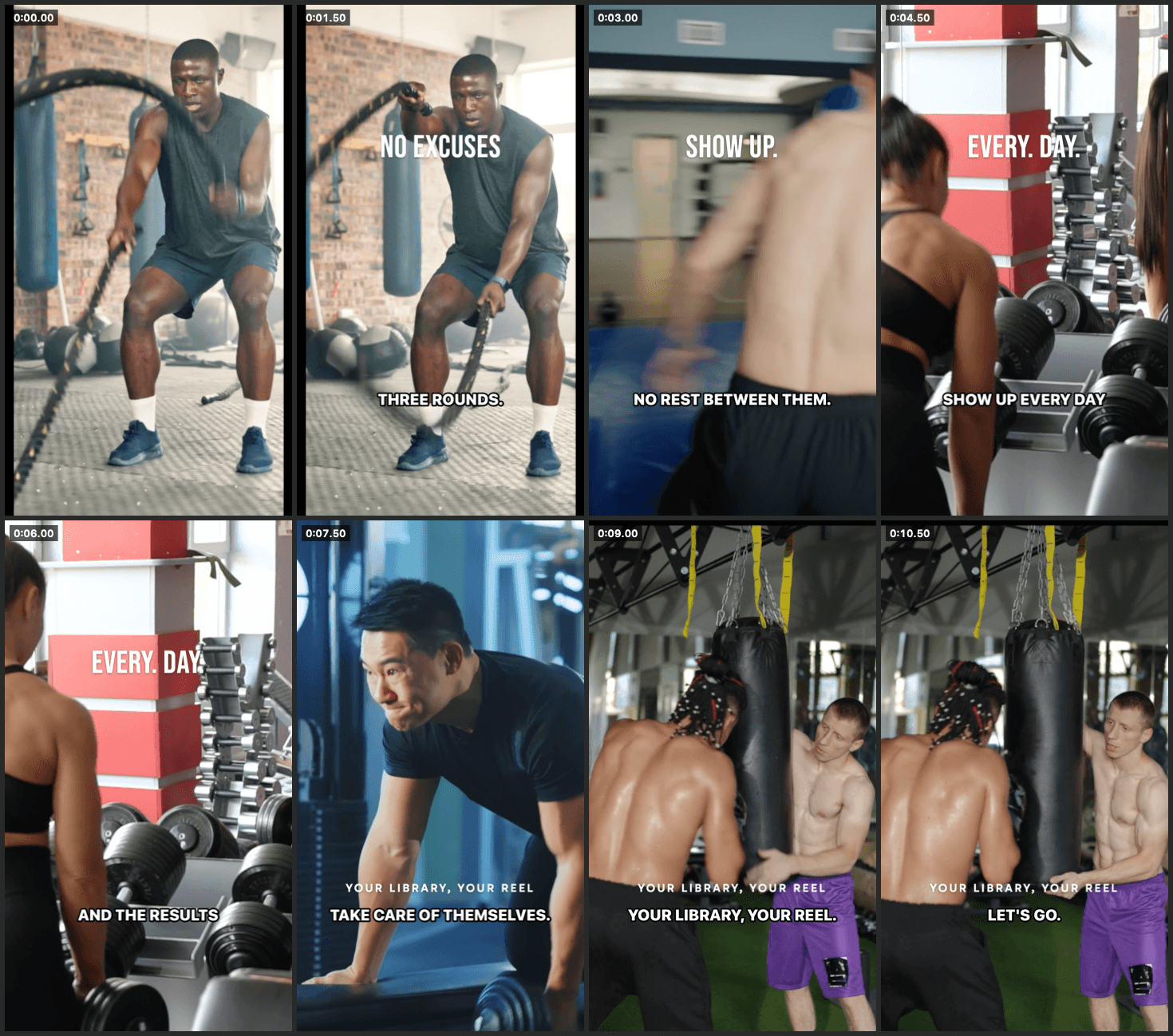
Claude Code looks at the contact sheet, notices the title sits under the caption bar, and fixes it: moves the title up, then looks at the frame again to check it clears the bar this time.
BetterEditsRead the workspace guide and the open video: Gym Hook, 9:16, 11 seconds, a Text track and a Subtitles track.BetterEditsMoved NO EXCUSES to start at 0.5 s. The clip under it is unchanged.BetterEditsSwitched the Subtitles track to Bold Outline, bottom, and looked at a frame to check the title clears the caption.Step 6: export
The agent exports a 4K 9:16 file, gym-reel.mp4, with the captions and title burned in and hidden tracks left out, the way the window would export it. When Claude Code exports, it is at 30 fps; for 24 or 60, press ⌘E in the app and pick it in the sheet.
Elapsed: a few minutes, most of it transcription and the render. You watched both apps do it.
Why it is safe to hand an agent the editor
The objection is reasonable, so here is the specific answer rather than a reassurance.
Same rules as the window. Claude Code works through the same code as the app, not a shortcut around it. It cannot reach a state the window can't, and it cannot skip a confirmation the window would ask for. BetterLibrary writes go through the same service layer as the window, so statuses, single-select rules and tag re-filing behave identically, and an open app reloads at once.
Undo in BetterEdits. Every change the agent makes lands as one ordinary undo step. If it trims the wrong clip, ⌘Z in the app puts it back, exactly as if you had dragged the edge yourself.
The guide names what cannot be undone. BetterLibrary has no undo stack. Its guide says so, and names reset and delete as the only destructive actions. Deletes go to the macOS Trash. A trim that rewrites a file, or a split that makes two, asks first in the app, and the guide tells the agent which actions are one-way.
The model sees what you export, not the project. In BetterEdits, the frames and contact sheets the app draws for the agent are its eyes. It never reads your raw footage. AI tagging in BetterLibrary sends a downscaled, silent copy of a clip to our AI service; captions send the track's audio to our transcription service; Clone Reel sends a copy of a public reel. Nothing else leaves the Mac, and the exact prompt is in Settings.
Imports are copies. BetterLibrary files originals into a dated folder inside the library; your source folder is untouched. BetterEdits copies imported media into the project's own media folder. Neither app ever modifies your camera roll.
The AI never approves. In BetterLibrary, the model can move a clip from New to Draft by filling it in. It never marks one Ready or Archived and never touches a manual property. The guide tells the agent not to mark clips Ready unless you asked it to approve them.
The honest limits
Both apps are version 0.1. The limits below are the ones that bite in real use, not a legal footnote.
- There is no undo in BetterLibrary. Whether you or Claude Code makes a change, there is no ⌘Z for it. Reset and delete are the only actions the guide calls out as destructive; everything else is a status or a tag you can change back.
- AI tagging needs the app open. Claude Code can queue a clip for tagging, but the open app runs the queue. If BetterLibrary is closed, the request waits.
- When Claude Code exports, it is at 30 fps. The export sheet offers 24 and 60 too; for either, press ⌘E in the app and pick it there.
- Clone Reel needs yt-dlp installed. The app uses it to fetch the public reel.
- Meaning search matches prose. It finds clips by their names, descriptions and highlight names. Untagged clips with no description are invisible to it, which is one more reason to let the AI tag a shoot on import.
- No publishing. The export is a local file. Getting it onto Instagram is AirDrop and the phone.
- BetterEdits needs macOS 15 or later. BetterLibrary runs on macOS 14.4 or later, Apple silicon or Intel.
Claude Code is what we build for and test with. Any agent that reads a CLAUDE.md-style guide works the same way, because there is nothing Claude-specific in how the apps behave.
Where this fits with the rest of the workflow
If you cut reels by hand today, the agent story is optional. The apps are complete without it: BetterEdits is a small, fast Mac editor in the spirit of Instagram's Edits (we compare it to the phone app in Instagram Edits on a Mac), and BetterLibrary is a clip library that finds the shot you mean (how to organize video clips on a Mac). Claude Code is there for the loop, when you want to hand it off.
The prompt at the top of this article is the reason to own both.
What to do next
Create a library in BetterLibrary, drop one shoot on it, and open Claude Code in that folder. Type: "Find the three best energetic clips, cut them into a 9:16 reel with captions, and export it." Then watch the two windows. Both apps are free to download from the download page; every plan starts with a free trial, and the steps that call a model (tagging, asking, captions, cloning) spend AI credits included in the plan. Plan details are on the pricing page.
Questions people ask
- Can Claude Code edit video?
- Yes, if the video tools teach it how. BetterLibrary and BetterEdits both write a CLAUDE.md guide into every library or workspace, so Claude Code can find clips, cut a timeline, caption it and export, while the apps show every step on screen.
- Do I need to learn anything to use this?
- No. You open Claude Code in a library or workspace folder and type a sentence, such as 'cut the clips in ./reel into a 20-second 9:16 piece, caption it, and export it'. The agent reads the guide and does it. The app windows work exactly the same way if you never open Claude Code at all.
- Is it safe to let an agent edit my video?
- The agent works through the same code as the window and cannot reach a state the window can't. In BetterEdits every change lands as one undo step. In BetterLibrary the only destructive actions are named as such in the guide and deletes go to the Trash. Imports are copies; sources are never touched.
- Does Claude Code see my footage?
- Only what it asks to see. In BetterEdits the agent looks at frames and contact sheets the app draws for it, with text and captions on, and reads those like any image. AI tagging in BetterLibrary sends a downscaled, silent copy of a clip to our AI service; captions send the track's audio to our transcription service. Nothing else leaves the Mac.
- Which Macs and versions does this need?
- BetterLibrary runs on macOS 14.4 or later, Apple silicon or Intel. BetterEdits needs macOS 15 or later. Both are version 0.1. Claude Code is what we build for and test with, but any agent that reads a CLAUDE.md-style guide works the same way.
Keep reading
- BetterEditsHow to Add Captions to Reels on Mac, AutomaticallyAdd captions to Reels on Mac: what Final Cut, iMovie, CapCut and Descript offer, then a step-by-step in BetterEdits from one keystroke to burned-in bars.
- BetterEditsBest Vertical Video Editor for Mac (7 Options Compared)The best vertical video editor for Mac depends on how much editor you want. Seven options for 9:16 reels, compared on captions, HDR and learning curve.
- BetterEditsCapCut Alternative for Mac, 6 Editors That Use Real FilesSix CapCut alternatives for Mac, ranked for short vertical video: what each does better, what it lacks, and what you give up when you leave CapCut behind.