

CapCut Alternative for Mac, 6 Editors That Use Real Files
Six CapCut alternatives for Mac, ranked for short vertical video: what each does better, what it lacks, and what you give up when you leave CapCut behind.
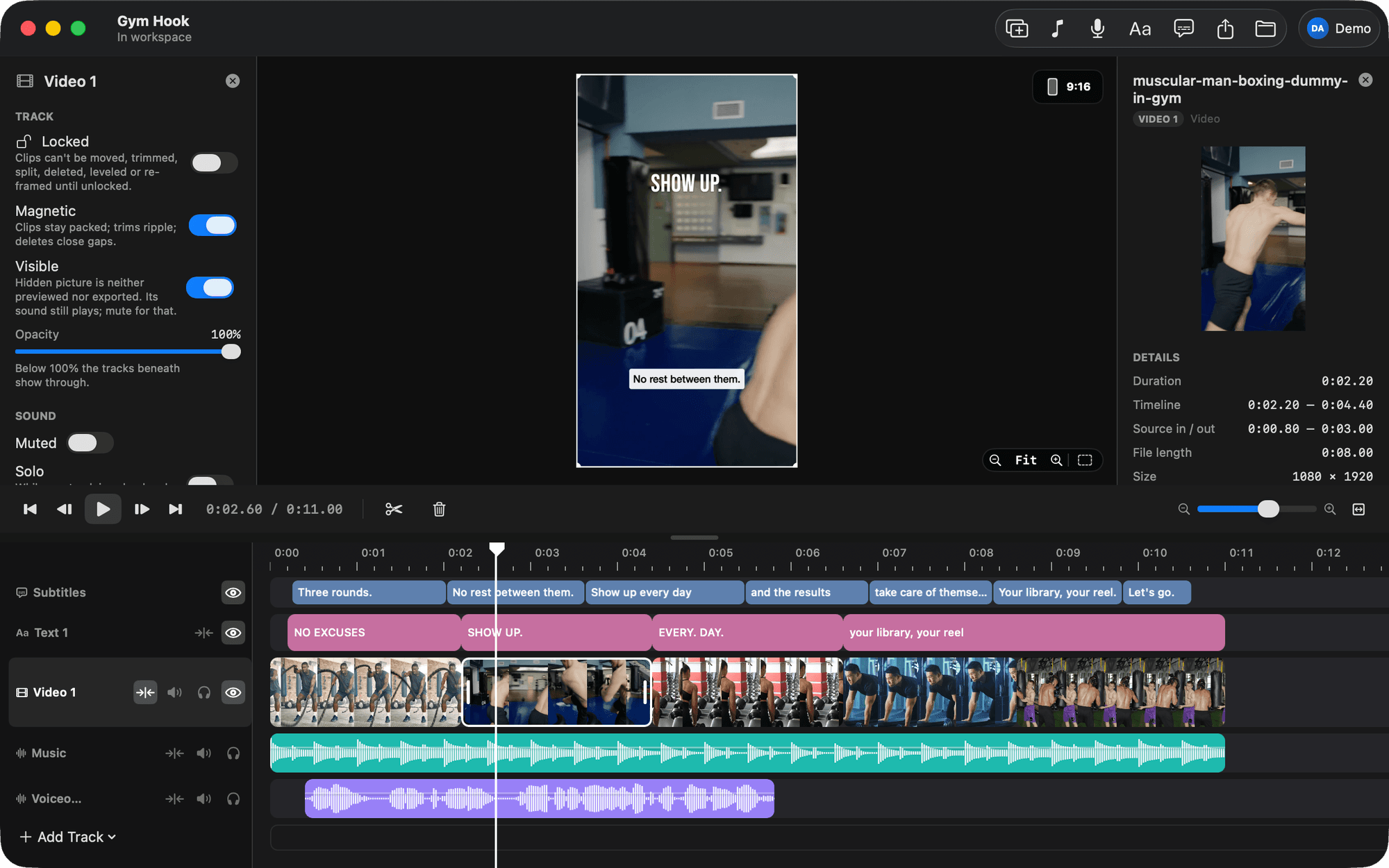
If you are searching for a CapCut alternative for Mac, you are usually after one of four things: an interface built for a keyboard and a big screen, no account between you and your footage, no paywall surprise at export, or plain files in folders you own. BetterEdits was built for that exact list, and it is first below. Final Cut Pro, DaVinci Resolve, iMovie, Descript and Adobe Premiere Pro follow, each with an honest fit.
Why people look for a CapCut alternative on the Mac
The best CapCut alternative for Mac depends on what pushed you out. For short vertical video, BetterEdits: one timeline, captions in one click, 9:16 by default, projects as folders. For long-form too, Final Cut Pro or DaVinci Resolve. For free and simple, iMovie. CapCut is a good phone editor, and that is the problem on a Mac.
The interface is phone-first. The Mac version carries the mobile layout across, so a 27-inch display ends up driving a workflow designed for thumbs. Keyboard-driven editing (S to split, ⌫ to ripple, ⌥→ to nudge a frame) is what a desktop is for, and CapCut's desktop build was not designed around it.
Account and cloud. You sign in. Projects live inside CapCut rather than in a folder you can back up, move to an SSD or hand to another editor. That is convenient until you want to leave, and then it is the whole problem.
Paid features and watermarks. CapCut is free with a paid tier. The templates and effects you are most likely to reach for are often the Pro-tagged ones, and you find out at export. People search "capcut watermark" often enough that it is clearly a recurring surprise.
Wanting real files. This is the one we hear most. A creator with two years of footage across Photos, AirDrop and a Drive folder wants a Mac, a folder structure, and an editor that reads from it. Not an app-shaped silo.
If one or more of those is you, here are six ways out, in the order we would try them.
1. BetterEdits, the closest thing to CapCut's speed on real files
BetterEdits is a native Mac editor with one timeline, in the spirit of Instagram's Edits app. Drop footage from Finder, trim frame-exact (the viewer shows the frame at the edge while you drag), split with S, caption with ⌥⌘T, record a voiceover with ⌘R while the timeline plays, export at 9:16 with ⌘E.
Where it beats CapCut for a Mac user:
- Files, not a silo. A library is a folder. A project is
projects/Name/project.jsonplus amedia/folder for anything imported and anexports/folder for the MP4s. It saves itself a second after every change, with full undo and redo. Move the folder to an SSD and it reopens. - Keyboard-first. Every action a reel needs has a shortcut, and the timeline is magnetic: drag a clip and its neighbours slide out of the way, trim an edge and everything ripples, delete and the gap closes.
- Captions that are actually right. One click transcribes the audio. Bars come back short, you merge, split or retime them inline, and a keywords list stops names and jargon being misheard. Eight caption presets, styled with a live 9:16 preview.
- HDR that survives. iPhone HLG footage is previewed in HDR and exported as 10-bit HEVC. The export matches the phone.
- Reels guides. Shade the Reels and Stories UI, the feed crop and the profile-grid crop in the viewer, so text and captions land where Instagram will not cover them.
- 17 Edits-style text looks. Classic, Modern, Strong, Neon, Typewriter, Meme, Poster and ten more, as bundled fonts, plus every font on your Mac.
- Claude Code can cut it for you. The app writes a guide into every workspace, so you open Claude Code there and ask. "Cut the clips in ./reel into a 20-second 9:16 piece, caption it, and put the title on the first clip" is a prompt, not a plan. More in edit video with Claude Code.
Where CapCut still wins: BetterEdits has no transitions, effects, keyframes, speed changes or colour tools, and no effects library to browse. It needs macOS 15 or later. It exports a local MP4 and does not post to any platform. And it is version 0.1, which means new, with the rough edges that implies. The apps are free to download, every plan starts with a free trial, and the AI features (captions, Clone Reel) spend credits included in the plan.
Fit: the solo creator who posts short vertical video several times a week, shoots on an iPhone, and wants a Mac tool that does exactly what a reel needs and nothing that waits on them. If that is you, start here. If your reels lean on effects, keep reading.
2. Final Cut Pro, if long-form is also on your plate
Final Cut Pro is Apple's professional editor, Mac only, a one-time purchase on the Mac App Store. Vertical projects are a setting. HDR runs through the whole pipeline. Recent versions transcribe audio to captions.
Advantages over CapCut: it is the most capable editor on this list that still feels like a Mac app, it owns nothing of yours (libraries are on your disk), and there is no paywall inside it. Everything is included after the purchase.
Drawbacks compared to CapCut: the setup tax. Library, event, project, settings, then the cut. For a long piece that is fine. For a 20-second reel it is most of the work, and you will notice. There is also no template or effects marketplace in the CapCut sense; the built-in titles and effects are what you get, plus third-party plugins.
Fit: you also deliver YouTube videos, client work or anything over a few minutes. Then Final Cut is the home for all of it and the reel is one more project. Our guide to exporting vertical video from Final Cut covers the 9:16 part.
3. DaVinci Resolve, the free full editor
DaVinci Resolve has a free version that is a complete editor, plus a paid Studio version. Mac, Windows and Linux. Vertical timelines, HDR, and audio-to-subtitle transcription in recent versions.
Advantages over CapCut: nothing behind a paywall in the free version that a reel needs, no account between you and the timeline, and colour tools that CapCut cannot approach.
Drawbacks: it is the hardest program on this list to learn. Resolve is built as pages (edit, colour, Fairlight for audio, deliver), and the first week is spent finding where things are. If you came to this article because CapCut on the Mac felt clumsy, Resolve will feel like a lot.
Fit: your footage needs grading, or you work with people on Windows or Linux.
4. iMovie, free and already installed
iMovie ships on every Mac. Free, simple, and enough for a straight cut with a title and a music bed.
Advantages over CapCut: no account, no paywall, no watermark, files on your disk.
Drawbacks: iMovie on the Mac is built around a landscape project, so vertical video is a workaround (rotate and crop, or finish on the iPhone version). No automatic captions; subtitles are typed as titles. If captions are on every reel, that is the deal-breaker.
Fit: the occasional poster who wants zero installs and does not need captions.
5. Descript, if you edit by transcript
Descript is a web and desktop editor where the transcript is the edit. Delete a sentence, the video cuts. Captions are native because the words are the timeline. Vertical output is supported.
Advantages over CapCut: the fastest way to clean up a talking-head take (ums, restarts, tangents) on a real keyboard, with captions that fall out of the process for free.
Drawbacks: when the reel is about picture (a gym montage, drone footage, a recipe with no narration) the transcript has nothing to hold on to and you are back to a conventional timeline that is not Descript's strength. Paid by subscription.
Fit: podcast clips, explainers, anything where a person talks to camera and the audio is the point.
6. Adobe Premiere Pro, for Adobe houses
Premiere Pro is Adobe's NLE, Mac and Windows, paid by subscription. Speech-to-text captions, auto-reframe from 16:9 to 9:16, HDR export.
Advantages over CapCut: a full editor on plain files, with After Effects next door for motion graphics.
Drawbacks: a monthly fee for a program of which a reel uses a sliver, and the same setup tax as Final Cut. If you are not already inside Creative Cloud, it is a strange place to start for short vertical video.
Fit: you already pay for Adobe, or your titles are built in After Effects.
CapCut vs the alternatives at a glance
| Platform | Projects live in | Captions | 9:16 | HDR export | Paid how | |
|---|---|---|---|---|---|---|
| CapCut for Mac | Mac, Windows, iOS, Android, web | The app (account) | Automatic | Yes | Check your build | Free, paid tier |
| BetterEdits | Mac (macOS 15+) | A folder you own | One click, editable bars | Default | Yes, 10-bit HEVC | Free download, subscription with trial, AI credits included |
| Final Cut Pro | Mac | A library on your disk | Recent versions | Yes | Yes | One-time purchase |
| DaVinci Resolve | Mac, Windows, Linux | A database or folder on your disk | Recent versions | Yes | Yes | Free, paid Studio |
| iMovie | Mac, iOS | A library on your disk | Titles only | Workaround | Recent versions | Free |
| Descript | Mac, Windows, web | Descript's cloud | Transcript is the edit | Yes | Not its focus | Subscription |
| Premiere Pro | Mac, Windows | Files on your disk | Speech to text | Yes, plus auto-reframe | Yes | Subscription |
What you give up leaving CapCut
Be honest with yourself about this part, because it is the reason people switch and switch back.
The template library. CapCut's templates are a real productivity tool: pick one, drop your clips into the slots, export. None of the editors above have an equivalent marketplace. The nearest thing is BetterEdits' Clone Reel: paste a public reel's link and it builds a project with that reel's structure as named placeholders ("Talking head: hook line", "B-roll: gym"), music and voiceover slots, and texts in a matching look, with the original riding on a reference track at 50% opacity so you can match it shot for shot. It is a template you make from a reel you admire, not a library you browse. Different thing, and for a series with a fixed format it is arguably the better one. It needs yt-dlp on the Mac and spends AI credits.
The effects library. Filters, stickers, animated effects, speed ramps. If your style depends on them, a small editor is the wrong move and Final Cut, Resolve or Premiere is the right one. BetterEdits has none of it on purpose.
Phone-and-desktop continuity. If you start cuts on your phone, CapCut's account is doing work for you. Every alternative here is a desktop tool; the phone's job becomes shooting and posting.
Trending audio inside the app. The Mac editors work with the audio you bring.
How to choose
Choose BetterEdits if you post short vertical video several times a week and want the CapCut speed on a Mac with your own files. Choose Final Cut Pro if you also cut long-form. Choose DaVinci Resolve if colour matters or your team is cross-platform. Choose iMovie for the occasional captionless cut. Choose Descript if the reel is a person talking. Stay on CapCut if your style is built from its templates and effects and you have made peace with the account.
There is a longer roundup, with the same options judged from a different angle, in the best vertical video editor for Mac.
What to do next
Export the source clips from your last three CapCut reels into a folder. Download BetterEdits from the download page, drop that folder on the timeline, and rebuild one of the reels: trim, ⌥⌘T for captions, ⌘T for the title, ⌘E to export. If it took less time than it did on CapCut and the file on disk is yours, you have found your alternative. Plans and the free trial are on the pricing page.
Questions people ask
- What is the best CapCut alternative for Mac?
- For short vertical video on its own, BetterEdits: one timeline, captions in one click, 9:16 by default, projects as plain folders. If you also cut long-form, Final Cut Pro or DaVinci Resolve. If you only need a simple free cut, iMovie is already on your Mac.
- Is there a free CapCut alternative for Mac?
- iMovie is free and preinstalled. DaVinci Resolve has a free version that is a full editor. BetterEdits is free to download and every plan starts with a free trial. CapCut itself is free with a paid tier, so the question is usually about the paid features, not the price of entry.
- Can I move my CapCut projects to another editor?
- Not as projects. No editor on this list opens CapCut project files. What moves is your source footage and any finished exports. Keep the originals in a folder from now on and the next switch is painless.
- Does BetterEdits have templates like CapCut?
- Not a library of them. It has Clone Reel, which takes a public reel's link and builds a project with the same structure as named placeholders you fill with your own footage, and templates are plain JSON you can import and export. There is no effects library.
- Which CapCut alternative keeps iPhone HDR footage?
- Final Cut Pro, DaVinci Resolve, Adobe Premiere Pro and BetterEdits all keep HDR through export. BetterEdits previews iPhone HLG as HDR and exports 10-bit HEVC when you choose HDR in the export sheet.
Keep reading
- BetterEditsHow to Add Captions to Reels on Mac, AutomaticallyAdd captions to Reels on Mac: what Final Cut, iMovie, CapCut and Descript offer, then a step-by-step in BetterEdits from one keystroke to burned-in bars.
- BetterEditsBest Vertical Video Editor for Mac (7 Options Compared)The best vertical video editor for Mac depends on how much editor you want. Seven options for 9:16 reels, compared on captions, HDR and learning curve.
- BetterEditsIs There an Edits App for Mac? Instagram Edits on macOSNo Edits app for Mac exists; Instagram Edits is iOS and Android only. The Edits workflow and how to get it on a Mac: one timeline, one-click captions.