

Best Vertical Video Editor for Mac (7 Options Compared)
The best vertical video editor for Mac depends on how much editor you want. Seven options for 9:16 reels, compared on captions, HDR and learning curve.
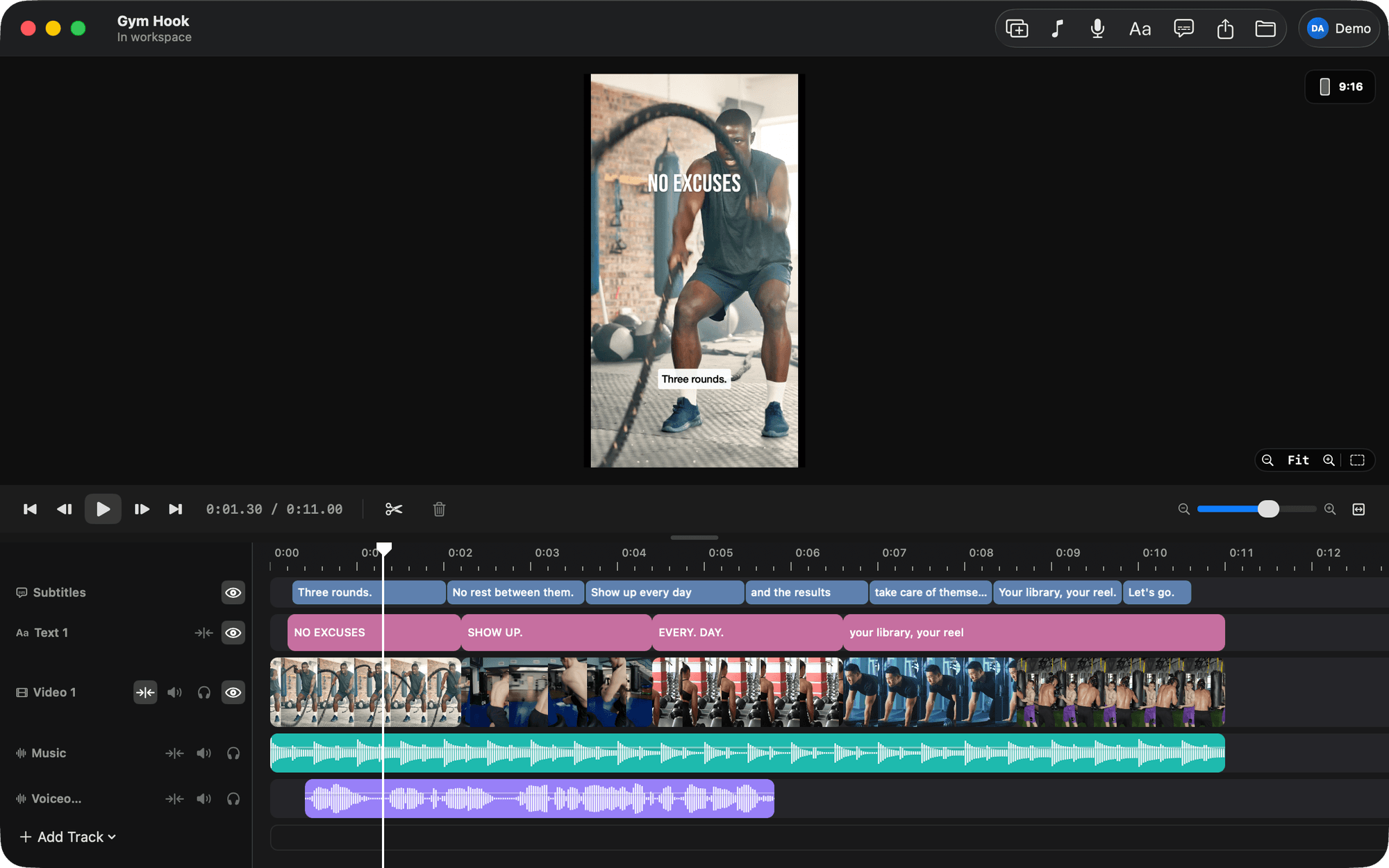
The best vertical video editor for Mac is the one that matches how much editing you actually do. If reels are the whole job, a small single-timeline app such as BetterEdits gets you from a folder of iPhone clips to a captioned 9:16 export with the least setup. If you also cut long-form, Final Cut Pro or DaVinci Resolve handle 9:16 and give you the rest of an NLE. Here are seven options, what each is for, and where each one costs you.
Which vertical video editor for Mac should you pick?
Pick BetterEdits if you cut short vertical video and nothing else, and want captions and HDR export without learning an NLE. Pick CapCut for Mac if templates matter more than owning files. Pick Final Cut Pro or DaVinci Resolve if long-form is also on your plate. Pick Descript if your video is mostly you talking to camera.
That is the whole verdict. The rest of this piece is the reasoning, because "best" for a fitness coach posting four reels a week is a different answer from "best" for a studio that also delivers a 12-minute brand film.
| Editor | Best for | The trade-off |
|---|---|---|
| BetterEdits | Reels, Shorts, TikToks on your own files | No effects, transitions or colour tools; macOS 15 only; new (version 0.1) |
| CapCut for Mac | Templates and trends, phone-and-desktop editing | Phone-first interface, account-based, Pro features behind a paywall |
| Final Cut Pro | Vertical plus long-form on one Mac | Setup tax on every small project; one-time purchase |
| iMovie | Free, already installed, simple cuts | Built around landscape; no automatic captions |
| DaVinci Resolve | Colour-heavy work, cross-platform teams | The steepest learning curve on this list |
| Adobe Premiere Pro | Adobe-house workflows, auto-reframe from 16:9 | Subscription; a full NLE for a 20-second job |
| Descript | Talking-head video edited from the transcript | Transcript-first, so b-roll-heavy cuts feel indirect |
1. BetterEdits, for people who only cut reels
BetterEdits is a native Mac editor built in the spirit of Instagram's Edits app: one timeline, four kinds of track (video, audio, text, subtitles), a 9:16 canvas by default, and an export sheet with HD, 2K and 4K. We built it because the two of us were tired of the choice between fat-finger trimming on a phone and opening Final Cut for a 20-second clip.
What it does that matters for vertical:
- Captions in one click. ⌥⌘T transcribes the track's audio and comes back as short subtitle bars you edit inline. Eight caption presets (Soft Pill, Bold Outline, Yellow Pop and so on) with a live 9:16 preview. Names and jargon go in a keywords list so they are not misheard.
- Reels guides. The viewer can shade the Reels and Stories UI, the feed crop and the profile-grid crop, so your captions do not end up under Instagram's caption box.
- HDR stays HDR. iPhone HLG footage is previewed as HDR and exported as 10-bit HEVC when you pick HDR in the export sheet. The reel looks like the phone did.
- Real files. A project is a folder with a
project.jsonthat saves itself a second after every change. Exports land in anexports/folder as MP4. - Claude Code can cut it for you. The app writes a guide into every workspace, so you can open Claude Code there and ask in a sentence. If that sounds abstract, this walkthrough of editing video with Claude Code makes it concrete.
The trade-off is deliberate. There are no transitions, effects, keyframes, speed changes or colour grading, and the preview is capped at 1080p so scrubbing 4K HDR stays quick. It needs macOS 15 or later. It is version 0.1, so it is new, and you should expect rough edges. The apps are free to download, every plan starts with a free trial, and the AI features (captions, Clone Reel) spend credits included in the plan.
If you have been editing on a phone and want the same speed on a Mac, this is the one to try first. If you need a dissolve, keep reading.
2. CapCut for Mac, for templates and trends
CapCut is the editor most short-form creators started on, and the Mac version carries the same design across. It is free with a paid tier, and the templates and effects library are the reason people stay.
Who it is for: creators who build reels from templates, or who start a cut on the phone and want to finish on the desktop inside the same app.
The trade-off: it is a phone app that grew a Mac window. Projects and assets live inside CapCut's world rather than in folders you manage, you sign in to an account, and some effects and templates are Pro-only. For a lot of people that is fine until the day they want their footage as plain files on an SSD. We wrote a separate piece on CapCut alternatives for the Mac for exactly that moment.
3. Final Cut Pro, for vertical plus everything else
Final Cut Pro is Apple's professional editor, Mac only, a one-time purchase on the Mac App Store. It edits vertical video without complaint: set a 9:16 project and every tool works as usual. It has HDR through the whole pipeline, and recent versions add transcription-based captions.
Who it is for: anyone who also delivers long-form. If you cut a 10-minute YouTube video and three reels from the same shoot, Final Cut is the reasonable home for all of it.
The trade-off is the setup tax. Library, event, project, project settings, render settings. None of it is hard, but for a 20-second reel the setup is most of the job, and that is the thing people mean when they say they hate opening Final Cut for a Reel. (A tangent: BetterLibrary, our library app, drags highlights straight onto a Final Cut event as losslessly trimmed files, so the two work together fine.) If you are already in Final Cut and only want the 9:16 part to go faster, read how to export vertical video from Final Cut.
4. iMovie, free and already on your Mac
iMovie is free, ships on every Mac, and is enough for a straight cut with a title and a music track.
Who it is for: someone who posts occasionally and does not want to install anything.
The trade-off: iMovie on the Mac is built around a landscape project, so vertical work means a workaround (rotating and cropping, or finishing on the iPhone version, which handles vertical better). There are no automatic captions, so subtitles are typed by hand as titles. Nothing wrong with it for a simple job, but if captions are on every reel you post, you will feel the gap by the third one.
5. DaVinci Resolve, for colour and cross-platform work
DaVinci Resolve has a free version that is more editor than most people will use, plus a paid Studio version. It runs on Mac, Windows and Linux. Vertical timelines are a setting, HDR is native, and recent versions transcribe audio to subtitles.
Who it is for: people whose footage needs grading, or teams that mix Macs with other machines.
The trade-off is the learning curve. Resolve is pages of tools (edit, colour, audio, delivery) and it assumes you want all of them. For a solo creator who wants a reel out the door before the coffee cools, it is the longest route on this list.
6. Adobe Premiere Pro, for Adobe houses
Premiere Pro is Adobe's NLE for Mac and Windows, paid by subscription. It has speech-to-text captions and an auto-reframe feature that turns a 16:9 sequence into 9:16 by tracking the subject, which is handy if your source material was shot landscape.
Who it is for: anyone already paying for Creative Cloud, or anyone whose motion graphics live in After Effects.
The trade-off: you are paying monthly for a full NLE and, for a reel, using a sliver of it. Same setup tax as Final Cut, different menus.
7. Descript, for talking-head video
Descript is a web and desktop editor where the transcript is the timeline: you cut the video by deleting words. Captions are native because the transcript is the edit. It supports vertical output.
Who it is for: creators whose reels are a person talking to camera, especially if the audio is the point (podcast clips, explainers).
The trade-off: when the cut is about picture rather than words (a gym montage, a drone sequence, a recipe with no narration) a transcript-first editor is an indirect way to work. You end up fighting for the timeline.
Comparison table: vertical video editors for Mac
| Editor | Platform | Learning curve | Captions built in | 9:16 canvas | HDR export | How it is paid for |
|---|---|---|---|---|---|---|
| BetterEdits | Mac (macOS 15+) | Low | Yes, one click | Yes, the default | Yes, 10-bit HEVC when the footage is HDR | Free download, subscription with a free trial, AI credits included |
| CapCut for Mac | Mac, Windows, iOS, Android, web | Low | Yes, automatic | Yes | Check your build | Free, with a paid tier |
| Final Cut Pro | Mac | Medium | Yes, recent versions | Yes | Yes | One-time purchase, Mac App Store |
| iMovie | Mac, iOS | Low | No, titles only | Workaround on the Mac | Recent versions | Free |
| DaVinci Resolve | Mac, Windows, Linux | High | Yes, recent versions | Yes | Yes | Free version, paid Studio |
| Adobe Premiere Pro | Mac, Windows | High | Yes | Yes, plus auto-reframe | Yes | Subscription |
| Descript | Mac, Windows, web | Low to medium | Yes, transcript is the editor | Yes | Not its focus | Subscription |
How to choose if you hate phone editing but do not want an NLE
This is the reader we built for, so here is the honest decision tree. Four questions.
Do you cut anything longer than a couple of minutes? If yes, buy Final Cut Pro (or use Resolve) and accept the setup tax, because you will pay it anyway for the long piece. If no, a full NLE is the wrong shape for your week.
Is your footage iPhone HDR? Then the export path matters more than any effect. Look for 10-bit HEVC export and an HDR preview. Flattened HDR is the most common reason a reel looks worse than the camera roll.
Do the captions have to be right the first time? If your reels use names, brands or jargon, you want an editor where you can feed the transcription a keyword list and fix bars inline. Typing captions by hand as titles (the iMovie route) is fine for one reel a month and misery at four a week. Our piece on adding captions to reels on a Mac goes through the options.
Do you want your footage in folders you own? If you have ever lost a project to an app's internal library, or wanted to move a year of footage to an SSD, this question decides it. Editors that work on plain files (Final Cut, Resolve, Premiere, BetterEdits) let you leave. App-shaped ecosystems make that hard.
If you answered no, yes, yes, yes, you are the person BetterEdits was built for. It is the Edits app workflow on a Mac (we cover that comparison in Instagram Edits on a Mac) with the parts a reel needs and none of the parts it does not.
What to do next
Download BetterEdits from the download page, drop one folder of iPhone clips onto the timeline, press ⌥⌘T for captions and ⌘E to export at 9:16. If the reel is out the door in a few minutes, you have your answer. If you found yourself reaching for a transition, one of the NLEs above is the better fit, and now you know which one. Details of what the plan includes are on the BetterEdits page.
Questions people ask
- What is the best vertical video editor for Mac?
- It depends on how much editor you want. For reels and Shorts on their own, a small single-timeline app like BetterEdits gets you from folder to 9:16 export fastest. If you also cut long-form, Final Cut Pro or DaVinci Resolve handle vertical fine and give you everything else too.
- Can Final Cut Pro edit vertical video?
- Yes. You set a vertical (9:16) project and Final Cut works the way it always does. It is a full editor, so expect library, event and project setup before the first cut, and a one-time purchase on the Mac App Store.
- What resolution should a vertical reel be?
- Instagram Reels, TikTok and YouTube Shorts are 9:16. The standard export is 1080 by 1920 pixels. Some editors, BetterEdits included, also export a 2K or 4K vertical file if your footage is that sharp.
- Is there a free vertical video editor for Mac?
- iMovie is free on every Mac, DaVinci Resolve has a free version, and CapCut is free with a paid tier. BetterEdits is free to download and every plan starts with a free trial, so you can cut a reel before paying anything.
- Do I need HDR export for iPhone reels?
- Only if you shoot in HDR on the iPhone and want the export to look like the phone did. HDR footage flattened to SDR looks dull by comparison. Final Cut, Resolve, Premiere and BetterEdits keep HDR through export; check iMovie and CapCut on the build you have.
Keep reading
- BetterEditsHow to Add Captions to Reels on Mac, AutomaticallyAdd captions to Reels on Mac: what Final Cut, iMovie, CapCut and Descript offer, then a step-by-step in BetterEdits from one keystroke to burned-in bars.
- BetterEditsCapCut Alternative for Mac, 6 Editors That Use Real FilesSix CapCut alternatives for Mac, ranked for short vertical video: what each does better, what it lacks, and what you give up when you leave CapCut behind.
- BetterEditsIs There an Edits App for Mac? Instagram Edits on macOSNo Edits app for Mac exists; Instagram Edits is iOS and Android only. The Edits workflow and how to get it on a Mac: one timeline, one-click captions.