

Is There an Edits App for Mac? Instagram Edits on macOS
No Edits app for Mac exists; Instagram Edits is iOS and Android only. The Edits workflow and how to get it on a Mac: one timeline, one-click captions.
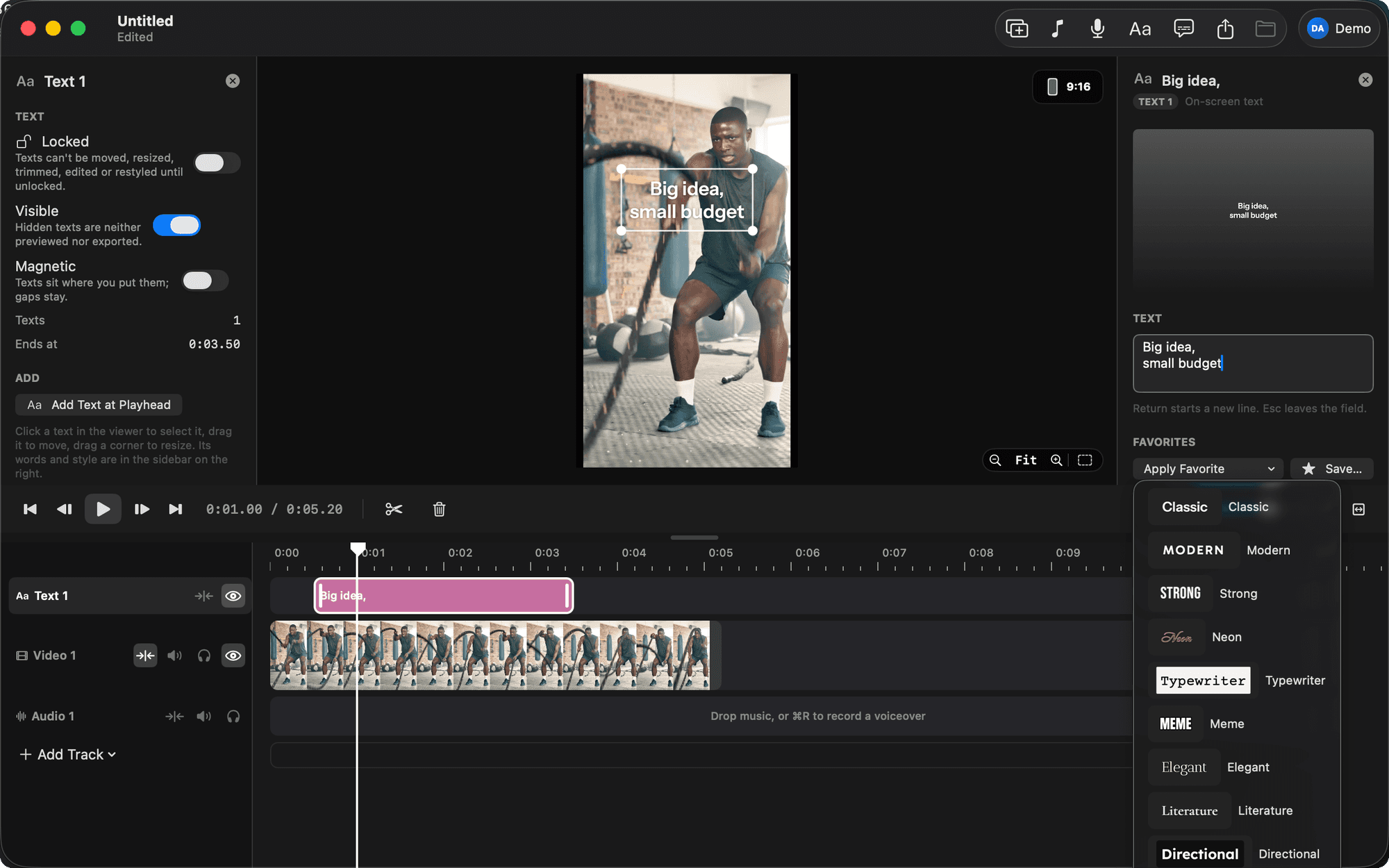
There is no Edits app for Mac. Edits is Meta's video editor for iOS and Android, and as of September 2026 it has no Mac version. If you want the Edits way of working on a Mac, one timeline, captions in one click, text looks, 9:16 and a share sheet, you use a different app built the same way. BetterEdits is the closest match; the alternatives and a full iPhone-to-posted-reel how-to are below.
Is there an Instagram Edits app for Mac?
No. Instagram's Edits app is mobile only: Meta ships it for iPhone and Android phones, and there is no macOS build. That leaves two routes for a Mac user. Keep cutting on the phone and use the Mac for storage, or move the whole reel to a Mac editor that works the way Edits does: one timeline, captions, 9:16, export.
This article is about the second route. We built BetterEdits for it, so we know the Edits workflow well enough to map it step by step, and we will be clear about where the Mac version differs.
What the Edits workflow actually is
Strip Edits down and it is a short list of moves. That list is why people like it, and it is the list any Mac replacement has to cover.
- One timeline. Clips packed edge to edge. Trim, reorder, split. No tracks to configure before the first cut.
- Captions in one tap. The audio is transcribed and captions appear on the video as short lines you can restyle.
- Text with looks. On-screen text picked from a set of ready styles rather than built from font menus.
- 9:16 by default. The canvas is a phone screen. You never set a project size.
- A share sheet, not an export dialog. Pick the quality, get the file, post.
That is the shape. Everything Final Cut Pro or DaVinci Resolve adds (libraries, events, render settings, colour pages) is what Edits deliberately leaves out, and the absence is the feature.
How to get the Edits workflow on a Mac
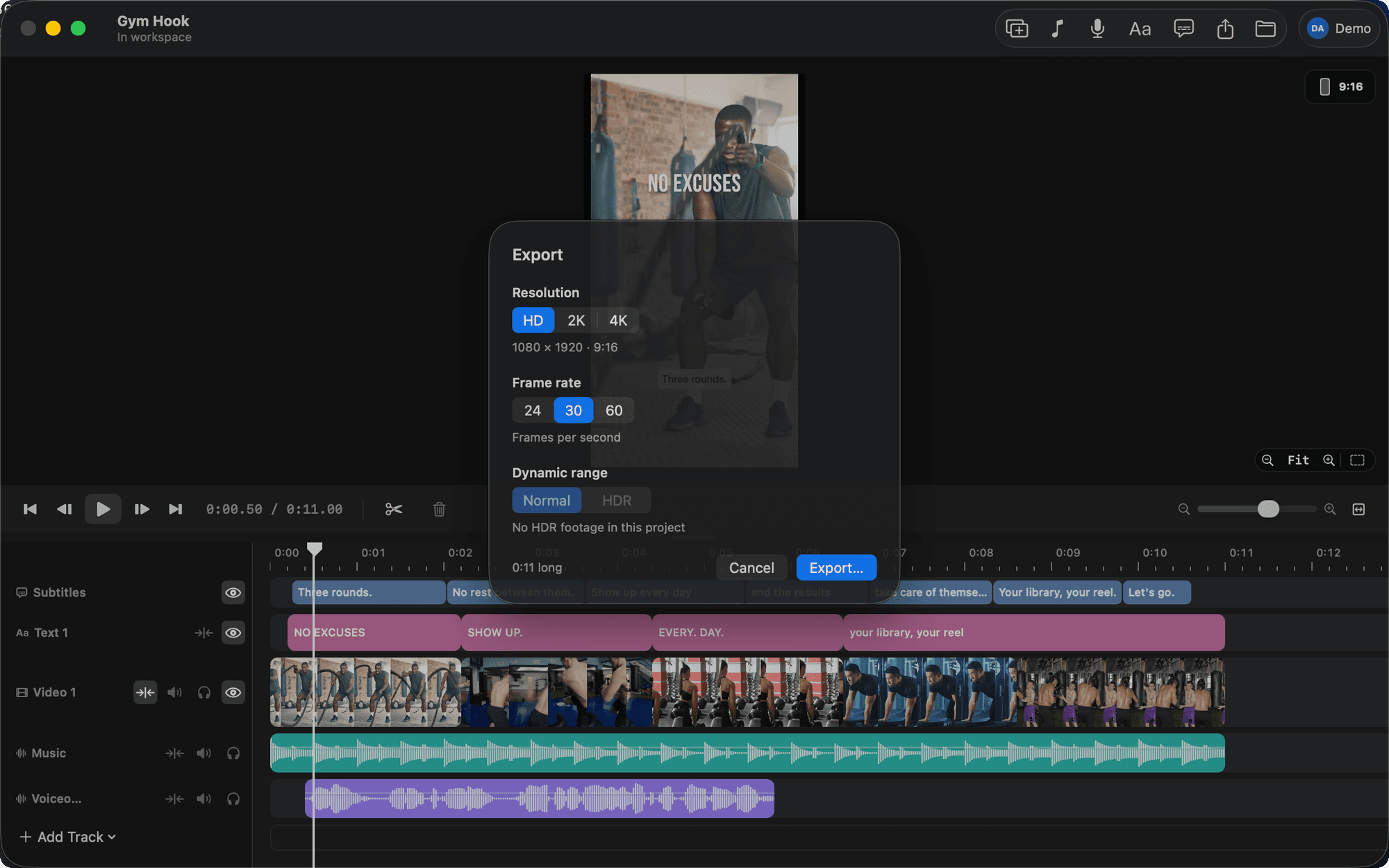
The direct answer: BetterEdits is a native Mac editor built in the spirit of Edits. One magnetic timeline, subtitles in one click, 17 Edits-style text looks, a 9:16 canvas by default with Reels guides, and an export sheet with HD, 2K and 4K, 24, 30 or 60 fps, and HDR when the footage is HDR. It runs on your own files and folders.
Here is the move-for-move mapping.
| The Edits move | On the Mac with BetterEdits |
|---|---|
| Add clips to the timeline | Drop files from Finder onto the timeline (or ⌘I). They land packed and snapped. |
| Trim and reorder | Drag an edge (the viewer shows the exact frame), drag a clip and neighbours slide aside. S splits at the playhead. |
| Captions | ⌥⌘T. The track is transcribed, split into short bars on a Subtitles track. Edit bars inline, pick one of eight caption presets. |
| Text styles | ⌘T. Type, then pick a look from 17 Edits-style looks or any Mac font. Drag and scale on the canvas. |
| Voiceover | ⌘R records from the playhead while the timeline plays, after a 3-2-1 count. Music ducks under it automatically. |
| 9:16 canvas | The default. 4:5, 1:1 and 16:9 are one click away and nothing moves when you switch. |
| Safe zones | Reels guides shade the Reels and Stories UI, the feed crop and the profile-grid crop. |
| Share sheet | ⌘E. HD, 2K or 4K; 24, 30 or 60 fps; Normal or HDR. The MP4 lands in the project's exports/ folder. |
What is the same
The feel. A magnetic timeline where a dragged clip makes its neighbours slide out of the way is the thing that makes Edits fast, and BetterEdits does it the same way, frame-exact, with a keyboard. Captions are a single command, come back as short bars, and are burned in at export with the same renderer the viewer uses, so what you see is what ships. The text looks are named and bundled so a reel keeps the same typography as the last one. The export sheet is built like the Edits share sheet on purpose.
What is different
Some of it is better on the Mac, some of it is not there.
Better: a real screen and keyboard. Files in folders you own (a project is a folder with project.json that saves itself after every change, with full undo). HDR that survives: iPhone HLG is previewed as HDR and exported as 10-bit HEVC. Frame-exact trimming. Placeholders (⇧⌘P) so you can block out a reel before the b-roll exists. Clone Reel, which takes a public reel's link and rebuilds its structure as named placeholders you fill with your own footage. And a guide written into every workspace, so Claude Code can do the cut for you (how that works).
Not there: BetterEdits does not post to Instagram, or anywhere. The export is a local MP4 you move to the phone. There are no effects, transitions, keyframes, speed changes or colour tools, and no stickers or sound library. It needs macOS 15 or later, and it is version 0.1, which means new. Every plan starts with a free trial, the app is free to download, and the AI features (captions, Clone Reel) spend credits included in the plan.
Alternatives to BetterEdits for the Edits workflow
Three other ways to get most of this on a Mac, with the honest catch for each.
CapCut for Mac. Free with a paid tier, automatic captions, templates and effects, and a design that comes from the phone. Closest to Edits in spirit, but your projects live inside CapCut's account rather than in folders, and the Pro-only features tend to announce themselves at export. The full comparison is in CapCut alternatives for Mac.
Final Cut Pro. Apple's professional editor, one-time purchase on the Mac App Store. Set a 9:16 project and it works, HDR and all, with transcription-based captions in recent versions. The catch is setup: library, event, project, settings, and only then the cut. Right if you also do long-form. Our guide on exporting vertical video from Final Cut covers the 9:16 part.
iMovie. Free and preinstalled. No automatic captions, and vertical is a workaround on the Mac version. Fine for a caption-free cut once a month.
For a wider roundup, see the best vertical video editor for Mac.
How to go from iPhone footage to a posted reel on a Mac
This is the loop we run ourselves. It assumes BetterEdits, but steps 1 and 8 apply to any Mac editor.
- Get the originals off the phone. AirDrop the clips to the Mac, or in Photos on the Mac select them and choose File > Export > Export Unmodified Original. Do not screen-record or re-share through a messaging app; you lose HDR and resolution. Put them in a folder named for the shoot.
- Drop the folder on the timeline. Open BetterEdits, ⌘N for a new project, then drag the clips from Finder onto the timeline. They land packed, in order. Photos become 3-second clips.
- Cut. Drag edges to trim (watch the viewer for the exact frame), S to split, ⌫ to delete and close the gap, drag to reorder. Hooks go in the first one to two seconds; the guide the app writes for Claude Code says the same thing.
- Captions. ⌥⌘T, pick the track, wait a moment. Bars appear on a Subtitles track. Merge or split any that read badly, fix a misheard name, and if it keeps happening add the name to the keywords list in Settings > Transcription. Pick a style; Bold Outline and Soft Pill are the safe ones.
- Text. ⌘T at the playhead, type the line, pick a look. Turn the Reels guides on and keep text out of the shaded regions, or the app's own UI will sit on top of it.
- Voiceover, if the reel has one. ⌘R, choose the mic, 3-2-1, talk while the cut plays. The music track ducks to 25% under your voice on its own.
- Export. ⌘E. Choose 4K if the footage is 4K, 30 fps for most reels, HDR if the sheet offers it (it only does when the footage is HDR). The MP4 lands in
exports/. - Get it back to the phone and post. AirDrop the MP4 to the iPhone, open Instagram, share it as a reel. This is the step no Mac editor does for you, so budget the thirty seconds.
What to do next
Move one shoot's worth of clips off your phone into a folder, download BetterEdits from the download page, and run the eight steps above on a single reel. If the result posts and looks like the phone did, you have your Edits app on the Mac. Everything the plan includes, and what the AI credits cover, is on the BetterEdits page.
Questions people ask
- Is there an Instagram Edits app for Mac?
- No. Edits is Meta's video editing app for iOS and Android. There is no Mac version as of September 2026. To get the same way of working on a Mac you use a native editor built around one timeline, captions and a 9:16 canvas, such as BetterEdits.
- What is the closest thing to the Edits app on a Mac?
- BetterEdits, which is built in the spirit of Edits: one magnetic timeline, subtitles in one click, 17 Edits-style text looks, Reels guides in the viewer and an export sheet with HD, 2K and 4K. It works on your own files and needs macOS 15 or later.
- Can I edit Instagram Reels on a Mac and post from the Mac?
- You can edit on the Mac. Posting is easiest from the phone: AirDrop the exported MP4 to your iPhone and share it from the Instagram app. No Mac editor on this page publishes to Instagram directly, BetterEdits included.
- Does BetterEdits have the same text styles as Edits?
- It has 17 text looks in the spirit of the Edits ones (Classic, Modern, Strong, Neon, Typewriter, Meme, Elegant, Poster and more) as bundled fonts, plus every font installed on your Mac. Favorites save a look so new texts start dressed.
- Will iPhone HDR footage still look right after editing on a Mac?
- Yes, if the editor keeps HDR through export. BetterEdits previews iPhone HLG as HDR and exports 10-bit HEVC when you pick HDR in the export sheet, so the reel matches what the phone showed.
Keep reading
- BetterEditsHow to Add Captions to Reels on Mac, AutomaticallyAdd captions to Reels on Mac: what Final Cut, iMovie, CapCut and Descript offer, then a step-by-step in BetterEdits from one keystroke to burned-in bars.
- BetterEditsBest Vertical Video Editor for Mac (7 Options Compared)The best vertical video editor for Mac depends on how much editor you want. Seven options for 9:16 reels, compared on captions, HDR and learning curve.
- BetterEditsCapCut Alternative for Mac, 6 Editors That Use Real FilesSix CapCut alternatives for Mac, ranked for short vertical video: what each does better, what it lacks, and what you give up when you leave CapCut behind.